
We're excited to announce that a new Country of Origin (COO) field is now live in the app! This update helps streamline international shipping by allowing clients to easily manage COO and HTS (Harmonized Tarif Schedule) codes directly in the system. This enhancement supports both manual updates and API integration, giving you more flexibility and control over your product data.
🌍What is Country of Origin (COO)?
The Country of Origin refers to the country where a product was manufactured, produced, or substantially transformed. It is a required data point for all international shipments and plays a key role in determining duties, tariffs, and admissibility into the destination country.
📦What is an HTS Code?
An HTS Code, or Harmonized Tariff Schedule code, is a standardized 10-digit number used to classify traded goods. It is required by customs authorities to assess:
- Applicable import duties
- Eligibility for trade programs or exemptions
- Product admissibility based on trade restrictions
Both COO and HTS codes must be declared accurately to avoid shipment delays, compliance issues, or unexpected fees.
If you are Shipping internationally, and both the COO and HTS Codes are not added to the product page data, label creation will fail, and order will be delayed.
🔍Where can you find COO and HTS Information?
- Supplier Documentation: Most manufacturers or suppliers will provide this on commercial invoices or product spec sheets.
- U.S. International Trade Commission HTS Search Tool: https://hts.usitc.gov
- Customs Broker or Trade Compliance Consultant: If you're unsure, your customs broker can assist with accurate classification.
✍️How to Add or Update COO in Our App
You now have two convenient options to update Country of Origin for each product variant:
1st Option: In the App (Manual Entry)
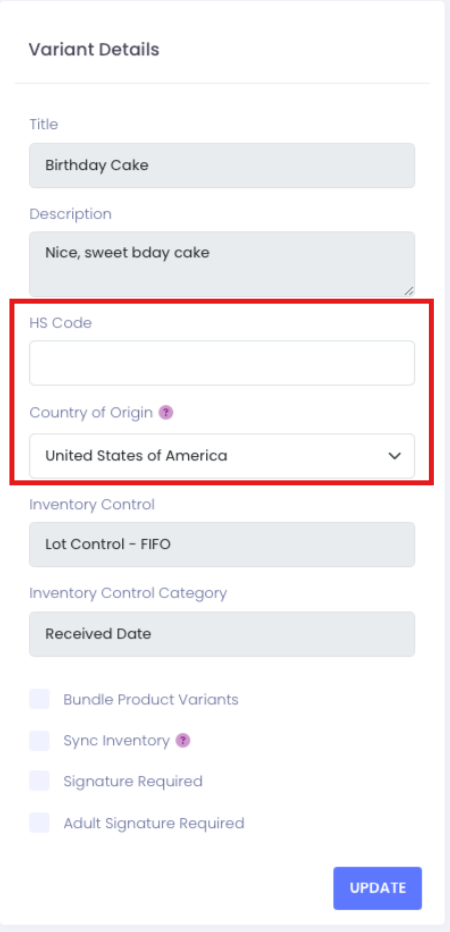
Navigate to the Product Variant Page, then scroll to the new "Country of Origin" field. You can manually enter the COO in this section.
2nd Option: Via API (Bulk/Programmatic Entry)
-
- If you prefer to update product data programmatically, you can now include COO through our Product Variant API endpoint.
If you have questions or need assistance updating your COO or HTS codes, please contact your Customer Service Rep at: Kase-Fulfillment@Kase.com
Comments
0 comments
Article is closed for comments.